Conference resource hub

From Intake to Instruction: A Human-Centered AI Workflowfor Academic Librarians

A practical AI-assisted workflow for transforming faculty requests into classroom-ready library instruction materials.

This page supports the conference presentation and gathers the automations, rationale, setup notes, screenshots, articles, and video walkthroughs in one place — so you can study the pieces, adapt what fits, and leave the rest.

The complete system

Four interconnected workflows, one human-centered loop.

Together, these tools help librarians move from request intake to instructional planning to course analysis to teaching-material creation — while keeping pedagogical control and oversight with the librarian.

  • 01Instruction Request Intake & Triage
  • 02ACRL-Aligned Instruction Planning Assistant
  • 03NotebookLM Course Material Analysis
  • 04Gamma Presentation Generation & PowerPoint Export

The flow

  1. Step 1

    Faculty Request

  2. Step 2

    Intake & Triage

  3. Step 3

    Instruction Planning

  4. Step 4

    Course Material Analysis

  5. Step 5

    Slides & Teaching Materials

  6. Step 6

    Librarian Review

Projects

Four projects, one continuous instructional workflow.

Each project is documented with rationale, demos, and setup notes. Read them as a system, or pick the one closest to a problem you're trying to solve.

01

Instruction Request Intake & Triage Assistant

Rationale

Academic librarians often receive instruction requests that vary widely in quality, completeness, and scheduling feasibility. This AI-assisted workflow standardizes the intake process, evaluates request clarity, checks calendar availability, and prepares actionable recommendations so librarians can spend less time on administrative triage and more time designing effective instruction.

What it does

  • Captures faculty instruction requests submitted through a Google Form
  • Organizes each request into a centralized Google Sheet
  • Uses OpenAI to generate an Instruction Planning Summary tailored for librarians
  • Classifies requests as Accepted or Needs Review based on assignment clarity
  • Performs a Google Calendar availability assessment for the requested session date
  • Recommends the librarian's next action based on both the triage decision and calendar assessment
  • Drafts a personalized follow-up email that can be sent directly to the faculty member
  • Updates the request record with AI-generated outputs for future reference and reporting

How it fits

This workflow serves as the front door of the library instruction process. It combines AI-powered instructional analysis with workflow automation and calendar integration to transform raw faculty requests into structured, actionable records that support instructional planning while keeping librarians in control of final decisions.

Setup & use

  1. 1
    Faculty submit an instruction request through a Google Form.
  2. 2
    The request is logged to a Google Sheet.
  3. 3
    Google Calendar checks for existing events on the requested session date.
  4. 4
    OpenAI generates an Instruction Planning Summary, determines the triage status, recommends the next action, and drafts a follow-up email using both the request details and calendar assessment.
  5. 5
    The Google Sheet is updated with the AI-generated outputs.
  6. 6
    The librarian receives an email containing the planning summary, triage decision, calendar assessment, recommended next action, and draft faculty response.
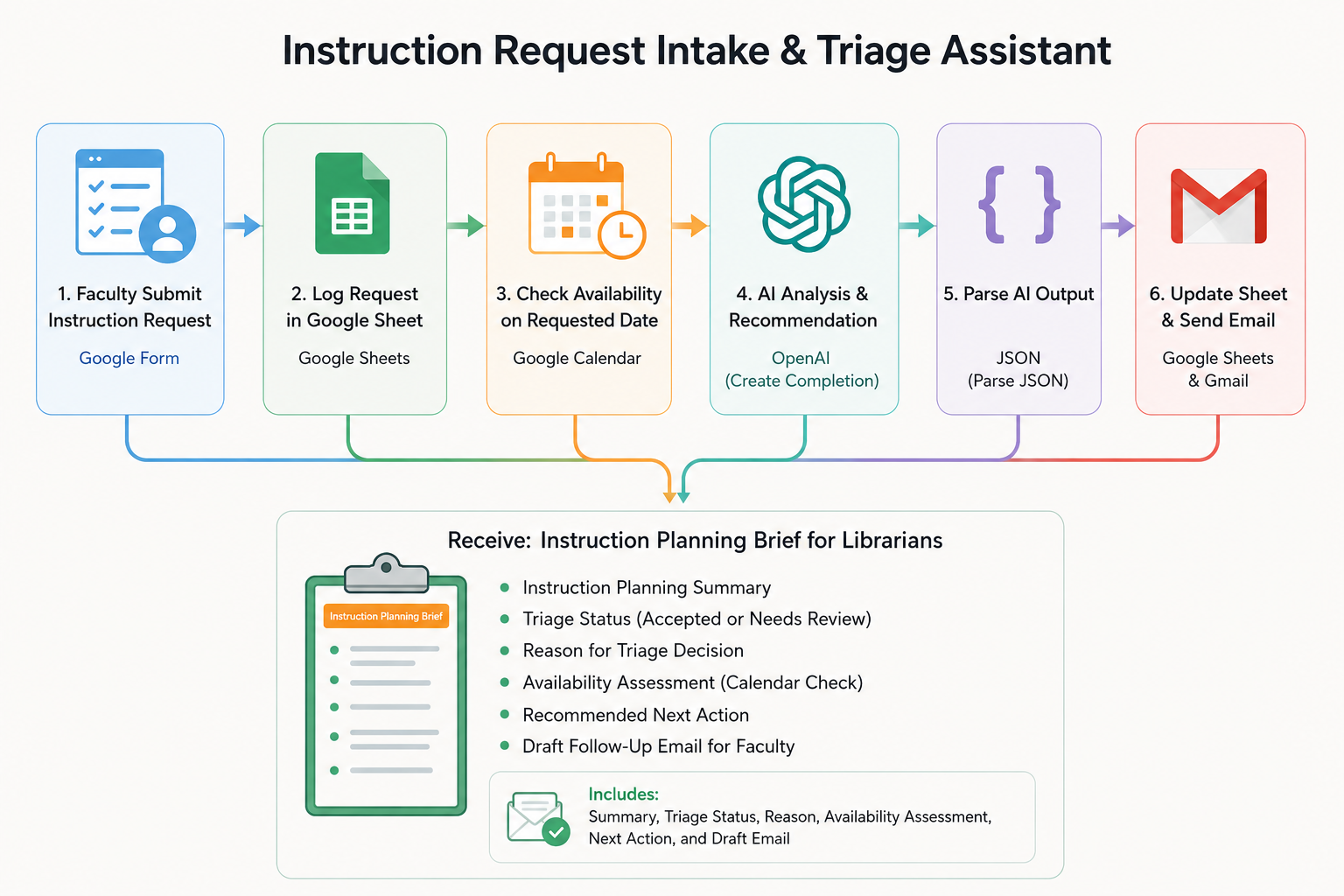
Instruction Request Intake & Triage Assistant workflow diagram
Key takeaway

The goal is not to automate instructional decisions. The system automates intake, organization, and preliminary evaluation so librarians can focus their attention where professional judgment is most needed.
02

ACRL-Aligned Instruction Planning Assistant

Rationale

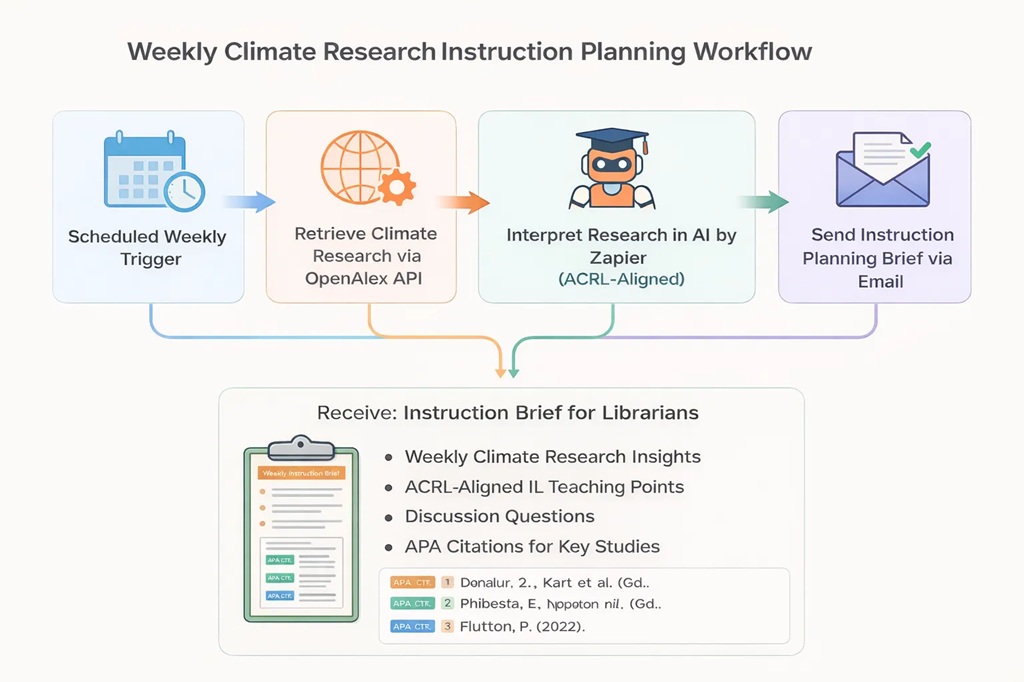
Keeping instruction current requires librarians to continually monitor new scholarship and translate emerging research into meaningful teaching opportunities. This workflow reduces that effort by transforming newly published research into instruction-ready planning materials aligned with the ACRL Framework.

What it does

  • Monitors newly published scholarly research
  • Identifies emerging themes and developments
  • Generates ACRL-aligned teaching focus points
  • Creates classroom discussion prompts and activity ideas
  • Produces properly formatted APA citations for featured sources

How it fits

After instruction requests have been triaged, this workflow helps librarians move from "What changed in the research?" to "How could I teach this?" It supports session planning by translating scholarly developments into instructional opportunities.

Setup & use

  1. 1
    Retrieve newly published research from a scholarly source
  2. 2
    Process article metadata through an ACRL-aligned AI prompt
  3. 3
    Generate teaching focus points, examples, and discussion questions
  4. 4
    Deliver a concise instructional planning brief to librarians
ACRL-Aligned Instruction Planning Assistant workflow diagram
Key takeaway

The goal is not to generate lesson plans. The system acts as instructional decision support, helping librarians connect emerging scholarship to information literacy concepts while maintaining full pedagogical control.

03

NotebookLM Instruction Planning Workflow

Rationale

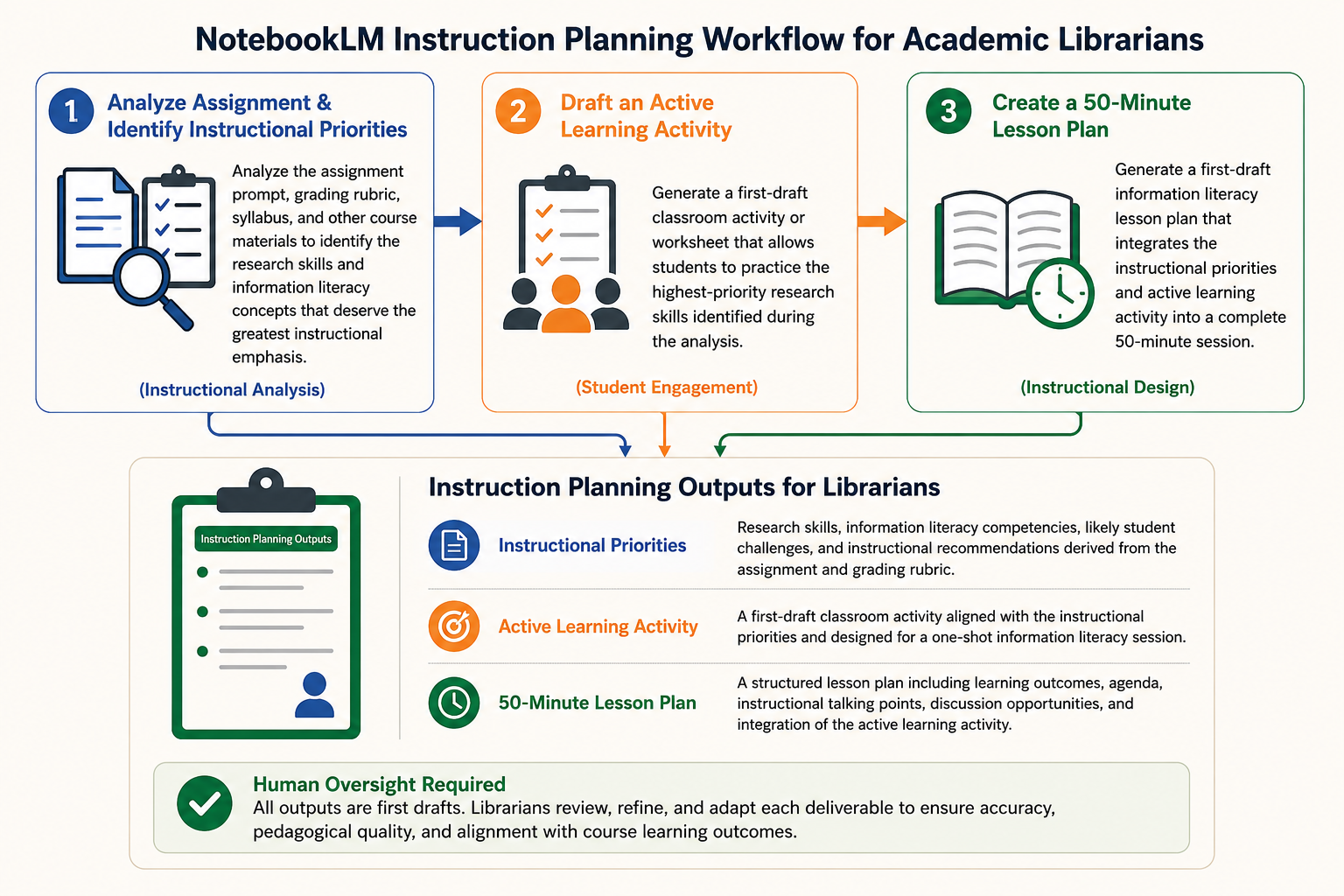
Preparing an effective library instruction session often requires librarians to review assignment prompts, grading rubrics, research worksheets, and other course materials to determine what students are expected to learn. NotebookLM accelerates this process by synthesizing those documents into practical instructional guidance, helping librarians develop stronger first drafts of instruction that remain grounded in course expectations and refined through professional judgment.

What it does

  • Generates a first draft of a lesson plan tailored to a specific research assignment
  • Compares assignment instructions with grading criteria to identify the research skills that deserve the greatest instructional emphasis
  • Drafts ready-to-use active learning activities that librarians can review, adapt, and incorporate into their teaching

How it fits

Supports the instructional planning process by transforming course documents into actionable teaching resources. Each output serves as a starting point that librarians review, refine, and adapt for their students, allowing them to spend less time interpreting assignments and more time creating engaging, assignment-aligned learning experiences.

Setup & use

  1. 1
    Create a NotebookLM notebook for the course or research assignment.
  2. 2
    Upload the assignment prompt, grading rubric, research worksheet, syllabus, or other relevant course materials.
  3. 3
    Use targeted prompts to identify instructional priorities, draft classroom activities, and generate a first-draft lesson plan that can be refined before instruction.

    Prompt 1 — Identify Instructional Priorities

    Show prompt +

    "Review the uploaded assignment prompt, grading rubric, research worksheet, syllabus, and any other course materials. Compare the assignment expectations with the grading criteria to identify the research skills students must demonstrate to succeed. Then produce: Instructional Priorities Rank the 5–8 highest-priority research and information literacy skills students should develop to successfully complete this assignment. Explain why each skill is important using evidence from the uploaded materials. Identify common areas where students are likely to struggle or misunderstand assignment expectations. Recommend what a librarian should emphasize during a 50-minute one-shot information literacy session. Identify any opportunities to incorporate the ACRL Framework for Information Literacy where appropriate. Base your recommendations only on the uploaded course materials. When possible, reference specific language from the assignment or grading rubric to justify your recommendations."

    Prompt 2 — Draft an Active Learning Activity

    Show prompt +

    "Using the instructional priorities you previously identified, create a first draft of an active learning activity for a 50-minute one-shot library instruction session. The activity should: Directly support the assignment requirements. Reinforce the highest-priority research skills. Encourage students to actively practice those skills during class. Be realistic to complete within a single library instruction session. Include: Activity title Learning objective(s) Estimated time Materials needed Facilitator instructions Student instructions Discussion or debrief questions Suggestions for adapting the activity to different class sizes Treat this as a first draft that will be reviewed and refined by the librarian before classroom use."

    Prompt 3 — Generate a First-Draft 50-Minute Lesson Plan

    Show prompt +

    "Using the uploaded course materials, the previously identified instructional priorities, and the active learning activity you generated, create a first draft of a 50-minute one-shot information literacy lesson plan tailored specifically to this research assignment. Design the lesson so that the instructional priorities naturally guide the session and the active learning activity reinforces the most important research skills students need for success. Include: Session title Overall session goal Learning outcomes A minute-by-minute agenda for a 50-minute session Key instructional talking points Opportunities for student questions and discussion Integration of the active learning activity within the lesson Materials or technology needed Suggestions for assessing whether students achieved the learning outcomes Optional follow-up resources students could use after class Treat this lesson plan as a first draft intended for librarian review and refinement. The final instructional decisions should remain with the librarian."

NotebookLM Instruction Planning Workflow workflow diagram
04

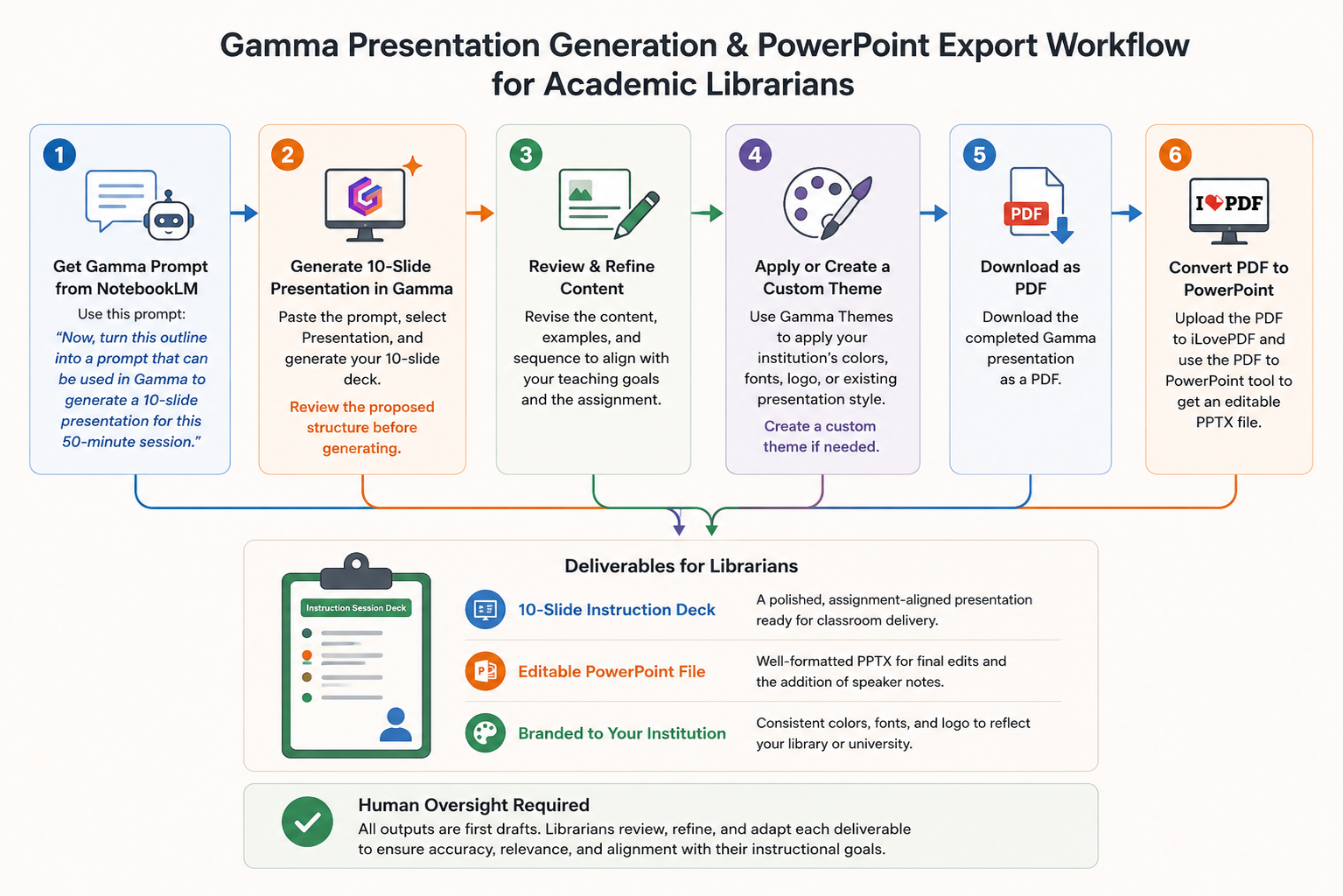
Gamma Presentation Generation & PowerPoint Export Workflow

Rationale

Gamma helps librarians turn an instruction plan into a polished first-draft presentation without building every slide manually. In this workflow, the 50-minute session outline created in NotebookLM becomes the foundation for a 10-slide teaching deck. The librarian remains responsible for reviewing the content, refining the teaching sequence, and confirming that each slide supports the course assignment.

What it does

  • Converts the NotebookLM lesson outline into a structured Gamma prompt
  • Generates a 10-slide presentation for the planned 50-minute session
  • Applies a custom theme based on institutional colors or an existing presentation template
  • Produces an editable PowerPoint version for final revisions and speaker notes

How it fits

The presentation-development layer: NotebookLM determines the instructional structure, while Gamma turns that plan into a visual first draft. The librarian then reviews the deck, adjusts the pacing and examples, and prepares it for classroom delivery.

Setup & use

  1. 1
    In NotebookLM, enter:
    "Now, turn this outline into a prompt that can be used in Gamma to generate a 10-slide presentation for this 50-minute session."
  2. 2
    Paste the generated prompt into Gamma, select Presentation, and generate the 10-slide deck.
  3. 3
    Review the proposed slide structure before generating, then revise the content, examples, and sequence as needed.
  4. 4
    Create or apply a custom Gamma theme to incorporate the institution's colors, fonts, logo, or existing presentation style.
  5. 5
    Download the completed Gamma presentation as a PDF.
  6. 6
    Upload the PDF to iLovePDF and use its PDF to PowerPoint converter to create an editable PPTX file.

Why use the PDF-to-PowerPoint route?

Gamma's native PowerPoint export may not preserve the presentation's formatting consistently. Converting the downloaded PDF through iLovePDF generally retains the visual layout more accurately.

A well-formatted PowerPoint version is especially useful when librarians want to make final edits, add slide-specific teaching notes, or adapt the presentation for future course sessions.

Human review

The generated deck is a first draft. The librarian should verify the accuracy of the content, replace generic examples with course-specific materials, confirm the pacing, and ensure that the final presentation reflects their own instructional approach.

View a sample PowerPoint presentation
Gamma Presentation Generation & PowerPoint Export Workflow workflow diagram
Ethics & oversight

AI supports librarian expertise. It does not replace it.

These workflows are built around a single conviction: automation should give librarians more room to teach well — not less room to decide.

  • Principle

    AI does not replace librarian expertise

    Every output is a draft. Subject knowledge, instructional judgment, and relationships with faculty stay with the librarian.

  • Principle

    Outputs require review and revision

    Treat generated text as raw material. Edit for context, accuracy, tone, and pedagogical fit before it reaches students.

  • Principle

    Sensitive data is handled carefully

    Avoid pasting identifiable student or faculty data into tools that don't meet your institution's data-handling standards.

  • Principle

    Transparency matters

    Be open with colleagues, faculty, and students about where AI is used in preparation and where it is not.

  • Principle

    Reduce workload, not pedagogy

    Automation should remove friction in the prep cycle — never flatten the nuance of how a session is taught.

  • Principle

    Librarians remain the designers

    The system orchestrates drafts. Librarians orchestrate learning.

Let's talk

Interested in adapting this workflow for your library or academic support context?

I'd love to hear what you're building, what's getting in the way, and where a small piece of automation might give your team back some teaching time.